


Geotab and OEM Telematics for GM Vehicles
Connect your eligible GM vehicles to Geotab through GPS Tracking Canada without adding a physical tracking device. Using GM’s built-in OnStar hardware, your fleet data can be securely brought into MyGeotab, giving you one place to view location, activity, performance, and vehicle insights. Geotab notes that this solution supports most 2015 and newer GM models with OnStar embedded hardware.
For OEM telematics solutions for other vehicle brands, view the full list here.
GPS Tracking Without Extra Hardware
With OEM telematics, there is no separate GPS device to install, maintain, remove, or reinstall when vehicles change. Once your vehicle’s VIN is confirmed, activation can be handled remotely, helping reduce downtime and avoid the cost of traditional hardware installation.

Bring Your GM Fleet Into MyGeotab
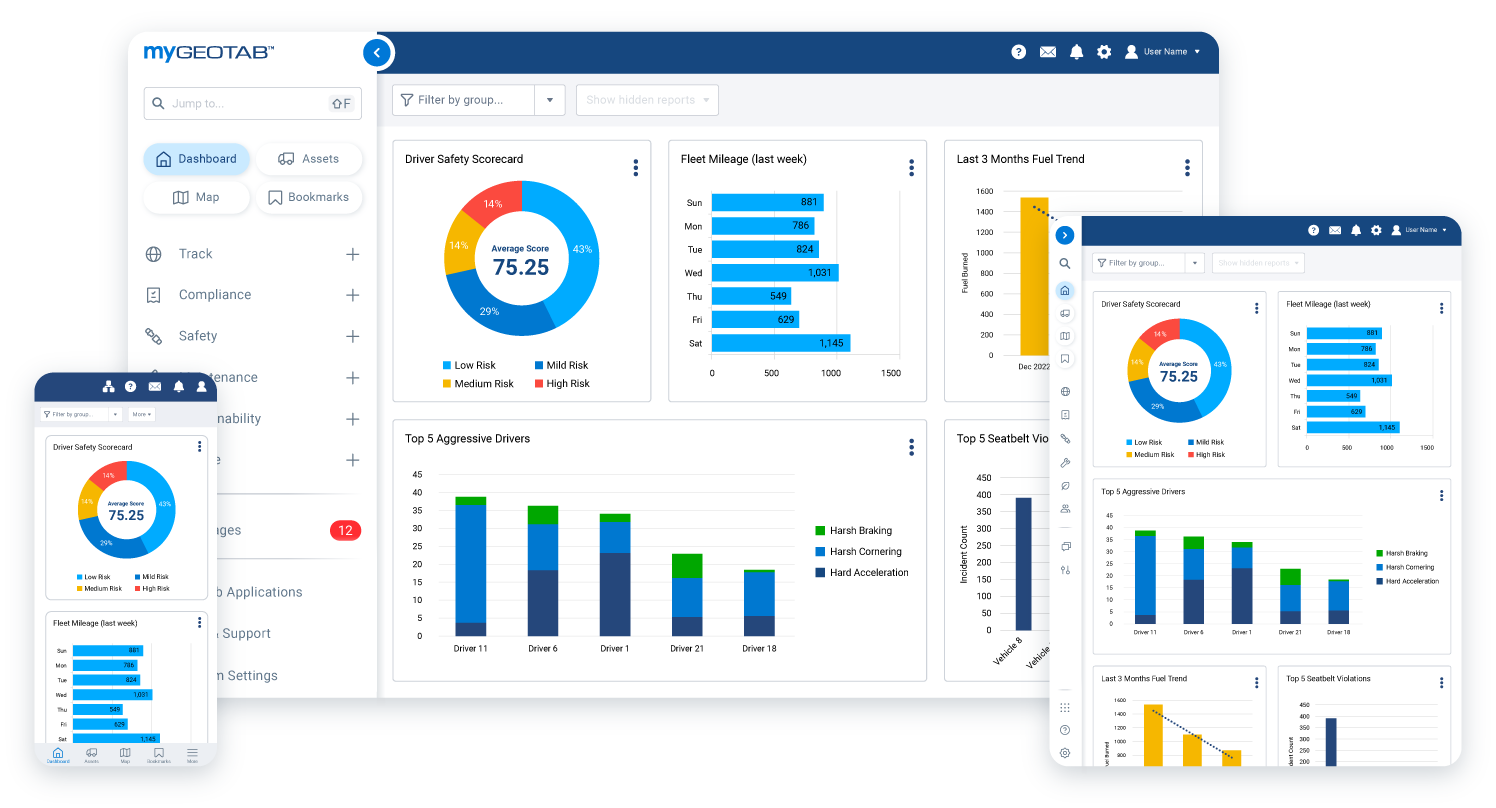
GPS Tracking Canada helps GM vehicle owners access their fleet data through Geotab’s MyGeotab platform. Whether your fleet includes gas, diesel, or electric GM vehicles, you can manage key information from one dashboard and make faster decisions based on real vehicle data.
Built-In Tracking for Better Fleet Visibility
OEM telematics uses the vehicle’s factory-installed hardware to collect and share important fleet information. This gives your business access to location tracking, trip activity, fuel usage, driver behaviour, safety reports, and more without installing an aftermarket device.


Support for Gas, Diesel, and Electric Vehicles
Manage gas, diesel, or electric vehicles on the same Geotab platform. With access to information such as fuel consumption, EV battery charge remaining, charging history, and activity reports, your team can better understand vehicle usage and improve fleet efficiency.
Reduce Downtime and Simplify Fleet Setup
Traditional GPS tracking often requires booking installation time, managing hardware, and handling device transfers between vehicles. OEM telematics removes much of that process by using the compatible GM hardware already built into the vehicle, making it easier to get your fleet connected and running.


Smarter Safety and Driver Insights
Geotab’s GM telematics solution can help you monitor driver behaviour, review safety trends, and identify areas for coaching. With insights into driving activity, speeding, harsh braking, and other fleet events, your business can take a more proactive approach to safety.

Want to Learn More?
Frequently asked questions
What is OEM telematics for GM vehicles?
OEM telematics for GM vehicles allows eligible GM models to connect to Geotab using the vehicle’s built-in OnStar hardware, instead of requiring a separate GPS tracking device. This lets fleet owners access vehicle data through MyGeotab.
Do I need to install a GPS tracking device in my GM vehicle?
No. Eligible GM vehicles with factory-installed OnStar hardware can be activated remotely, which means there is no separate device installation required.
How does GM OEM telematics work with Geotab?
Vehicle data is collected through the GM vehicle’s built-in system, transferred securely to Geotab, standardized, and then displayed inside MyGeotab for fleet management.
Which GM vehicles are compatible?
Geotab notes that most 2015 and newer GM models with OnStar embedded hardware may be supported. Compatibility can vary, so your VIN should always be checked before activation.
Can GPS Tracking Canada help me check compatibility?
Yes. GPS Tracking Canada can help GM vehicle owners confirm whether their vehicles are eligible for OEM telematics activation before getting started.
What information can I see in MyGeotab?
Depending on vehicle compatibility, you may be able to view location, trips, activity reports, driver behaviour, fuel consumption, safety reports, EV battery charge, charging history, and other fleet metrics in MyGeotab.
Does OEM telematics support GM electric vehicles?
Yes. Geotab’s GM solution supports both electric vehicles and internal combustion engine vehicles, allowing fleets to manage different GM vehicle types on the same MyGeotab platform.
Can I track fuel usage with GM OEM telematics?
Yes. Fuel consumption reports are available for compatible GM vehicles, helping fleet managers better understand vehicle usage, idling, and operating costs.
Can I monitor GM EV battery information?
Yes. For supported GM electric vehicles, MyGeotab can show EV-related information such as battery charge remaining, state of charge, charging history, and vehicle activity.
Is GM OEM telematics available in Canada?
Yes. GM OEM telematics with Geotab is available in Canada for eligible vehicles. GPS Tracking Canada can help confirm compatibility and guide you through the activation process.
Is there vehicle downtime during setup?
In most cases, no installation appointment is needed. Since the hardware is already built into eligible GM vehicles, activation can be completed remotely after the VIN is confirmed.
What are the benefits of using built-in GM hardware?
Using built-in GM hardware can reduce device costs, installation costs, vehicle downtime, and the need to remove or reinstall hardware when vehicles are sold or replaced.
Can OEM telematics help improve fleet safety?
Yes. MyGeotab can provide driver behaviour monitoring, safety reporting, risk insights, and alerts that help fleets identify risky driving patterns and support safer driving habits.
Does GM OEM telematics include driver coaching?
Some GM telematics plans may support driver feedback features such as alerts for seat belt use, hard acceleration, hard braking, and speeding. Availability can vary by vehicle, model year, region, and plan.
Can I manage GM vehicles with other vehicle brands in MyGeotab?
Yes. One of the benefits of OEM telematics with Geotab is that data from multiple vehicle manufacturers can be viewed in one platform, making mixed-fleet management easier.
Is OEM telematics only for large fleets?
No. OEM telematics can be useful for businesses of different sizes that want GPS tracking and fleet data without adding physical devices to eligible vehicles.
Can I use GM OEM telematics for compliance reporting?
Geotab can support compliance-related tools such as vehicle inspection reports, IFTA reporting, and dashboards to help reduce violations. Available features may depend on your plan and vehicle compatibility.
Is the hardware tamper-resistant?
Because the telematics hardware is built into the vehicle, it is harder to remove or tamper with compared to an external aftermarket GPS tracking device.
Can GM OEM telematics help with maintenance?
Yes. MyGeotab can support fleet maintenance and performance monitoring, helping fleet managers identify issues, review vehicle activity, and manage operations more proactively.
How do I get started with OEM telematics for my GM vehicles?
Contact GPS Tracking Canada with your GM vehicle details or VINs. Our team can help confirm compatibility, explain available Geotab service options, and guide you through activation so you can start managing your fleet in MyGeotab.

Check Pricing
All of our GPS tracking solutions are customized for your business and tailored to your budget...

Return on Investment
At GPS Tracking Canada, we understand that every company benefits from GPS Tracking in different ways...

Request a Demo
Get a live one-on-one demonstration from GPS Tracking Canada. See for yourself how customized...
For more information, or to schedule a demo or an installation,
call us toll free at 1.877.477.0987