


Geotab Investigations
Centralized Fleet Incident Investigation in MyGeotab
Geotab Investigations is a case management feature built directly into MyGeotab to help fleet teams investigate collisions, complaints, property damage, speeding incidents, safety events and other fleet-related incidents. By bringing vehicle activity, incident data and supporting documentation together in one structured case, Investigations helps teams understand what happened and keep the investigation organized from start to finish.
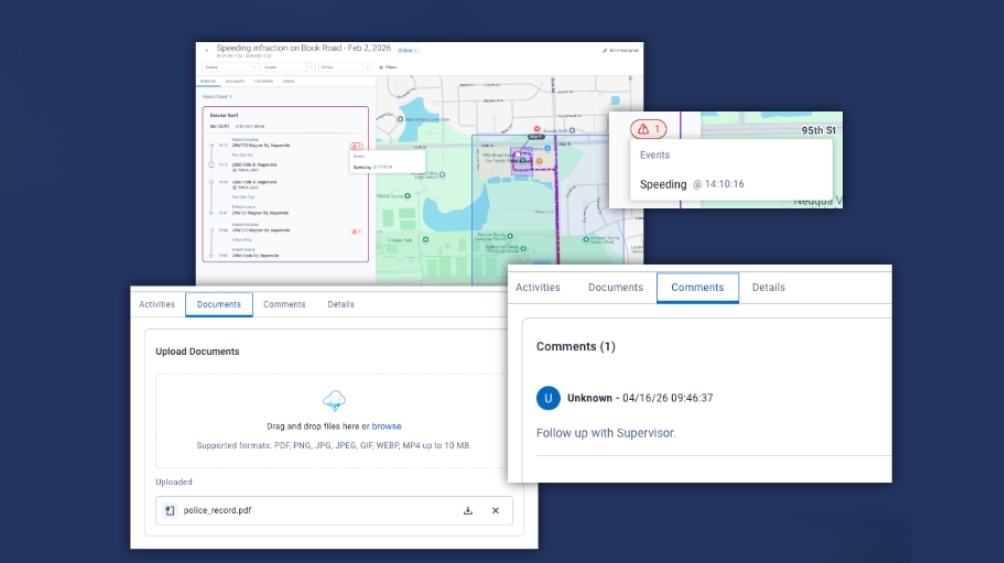
Instead of gathering information from separate systems, emails and files, fleet, safety, compliance and operations teams can search for activity by location and time, reconstruct the events surrounding an incident, add supporting evidence and manage the case through its lifecycle in MyGeotab.

Faster Incident Investigation
Find relevant fleet activity
When an incident occurs, getting the right information quickly can be challenging. Geotab Investigations allows users to define a location and time window to identify vehicle activity related to an event. Relevant activity can include trips, speeding, harsh braking, collisions and other telematics-based events, helping investigators narrow down what happened without relying on multiple separate reports.
Centralized Evidence Management
Keep supporting information with the case
A complete investigation often requires more than telematics data. Geotab Investigations allows users to add supporting materials such as notes, emails, reports, documents, images and video to the investigation. This keeps relevant information together with the vehicle activity and event data in a single case.
With supporting documentation organized alongside incident activity, teams can maintain a more complete record for internal reviews, insurance claims, compliance needs and other operational decision-making.

Complete visibility for every investigation
Connected Vehicle Intelligence
A complete picture of every incident
Incident investigations often involve information from multiple sources, including vehicle activity, driver behaviour, location data, documents, photos and video. Geotab Investigations brings this information together within MyGeotab, giving fleet teams a centralized workspace for discovering what happened, collecting supporting evidence and managing the investigation through its lifecycle. By connecting incident activity with the documentation surrounding it, Investigations can help teams establish a clearer timeline, organize case information and support more informed decisions across safety, operations, compliance and claims management.

Want to Learn More?
Have questions or need more information? Our team is here to help! Reach out to us today to learn how we can assist with your fleet needs and ensure your fleet stays compliant and safe. Contact us now to get started!
Frequently asked questions
What is Geotab Investigations?
Geotab Investigations is a case management feature in MyGeotab that helps fleet teams investigate incidents, claims and complaints by bringing vehicle activity, supporting evidence and case management into one centralized workspace.
What types of incidents can it help investigate?
The feature can be used for a range of fleet-related events, including collisions, property damage, speeding incidents, complaints and other situations where teams need to determine what happened and organize supporting information.
How can I determine which vehicles were involved in an incident?
You can define a location and time window to identify vehicles that were active in the area. The resulting activity can help narrow down which vehicles and events may be relevant to the incident.
What information can be reviewed around an incident?
The available activity can include vehicle movement and events such as speeding, harsh braking and collisions. Reviewing these details together can help provide context about what occurred before and after an event.
Can an investigation be started from Area Activity?
Yes. An Area Activity search can be converted into an investigation case, allowing the relevant location and time-based activity to become the starting point for a more structured review.
Can I filter the activity included in a case?
Yes. Activity can be refined using filters for groups, assets and drivers. The investigation area can also be resized and the relevant date range adjusted as the review develops.
What types of evidence can be added?
Supporting material can include notes, images, documents and short videos. Geotab’s product information also specifically identifies items such as emails, police reports and dashcam footage as examples of evidence that can be included in a case.
Can the investigation area or date range be changed?
Yes. The investigation’s area and date range can be adjusted as the scope of the review changes, allowing teams to focus on the most relevant activity.
How are cases organized and tracked?
Each investigation is maintained as a persistent case within MyGeotab. Cases can be managed through Open, Closed and Archived stages, making it easier to distinguish active work from completed or archived investigations.
Can completed cases be revisited?
Yes. Cases remain available after they are created and can be revisited as needed. This provides a centralized record that can be referenced for future reviews, claims, disputes or compliance-related purposes.
Who can access sensitive investigations?
Access can be managed using three investigation-level clearances: Viewer, Editor and Admin. These roles allow organizations to control who can view a case and who can contribute to its contents.
Can managers quickly find active investigations?
Yes. The main Investigations page provides a centralized view of cases and includes information such as the investigation name, creator, creation date, date range, description and status. Filters and summary cards can also be used to surface open or recent cases.
Can the system be used for insurance claims?
Yes. The centralized case record can help organize vehicle activity and supporting documentation for insurance-related reviews and claims. The recorded investigation activity can provide a reference point when documenting what occurred.
Can it support compliance or legal-related reviews?
It can help organize information for compliance purposes, legal disputes and other formal reviews by keeping relevant activity and supporting evidence together. However, the feature should not be treated as a substitute for an organization’s legal, records-retention or evidence-preservation procedures.
Can summary reports be generated?
Yes. Geotab’s July 2026 release notes identify summary reports as one of the capabilities introduced with the feature, alongside event tracking, evidence attachments, workflow management and access controls.
Does a case need video evidence?
No. Video is one type of supporting material that can be added, but investigations can also contain vehicle activity, notes, images, documents and other information. This means a case can be built around the available evidence rather than requiring a specific evidence type.
Can the feature be used for complaints that are not collisions?
Yes. The intended use cases extend beyond collisions to include claims, complaints, speeding incidents, property damage and other fleet-related situations where organizations need to review what happened.
Does it replace other fleet activity searches and reports?
The feature builds on Area Activity rather than replacing the underlying fleet data. An area and time-based search can identify relevant activity, after which that information can be carried into a dedicated case for evidence collection and ongoing management.
Is Geotab Investigations a legal-hold or evidence-preservation system?
No. It is designed to organize and manage investigation information, but it should not be considered a legal-hold, evidence-preservation or custodial service. Organizations remain responsible for meeting their own legal and records-management requirements.

Check Pricing
All of our GPS tracking solutions are customized for your business and tailored to your budget...

Return on Investment
At GPS Tracking Canada, we understand that every company benefits from GPS Tracking in different ways...

Request a Demo
Get a live one-on-one demonstration from GPS Tracking Canada. See for yourself how customized...
For more information, or to schedule a demo or an installation,
call us toll free at 1.877.477.0987